Showing posts with label JustForFun. Show all posts

Sunday, January 3, 2010

iSCSI/NFS on LVM on RAID5 (Software RAID) howto guide, CentOS 5.3

This is just a quid blog to show howto, cos I found there are not much on-line tutorial cover this in a easy way.

And of course, as I keep it simple, it only cover basic stuffs. Please feel free to comment and add on better approach.


## RAID ##
===============================
Links:
http://www.linuxhomenetworking.com/wiki/index.php/Quick_HOWTO_:_Ch26_:_Linux_Software_RAID

= Create Partition with 'fdisk'
to create partition (with 'n')
modify the partition's label to RAID (with 't', and code is fd)
then 'w' to write the partition
repeat until the disks is done
do a 'partprobe' to make sure it's written and take effect
do 'fdisk -l' to make sure the partition tables is correct

= Assign disk to raid
mdadm -C -v /dev/md0 -l5 -n3 /dev/hdb1 /dev/hdc1 /dev/hdd1
# l5 => RAID 5, n3 => a RAID set of 3 disks
cat /proc/mdstat # make sure RAID is created. it will also show if it's sync-ing or recoverying
mdadm -D -s -v # Double check. or 'mdadm -D -s -V /dev/md0


## LVM ##
===============================
Links:
http://www.howtoforge.com/linux_lvm_p3

= Create Physical Volume(PV), Volume Group(VG) and Logical Volume(LV)
pvcreate /dev/md0 # assign "/dev/md0" as an PV
pvdisplay # make sure they're all set
vgcreate vg-raid /dev/md0 # create VG group "lvm-raid"
vgdisplay # Show the Volume Group status
lvcreate -n xStorage -L 40G vg-raid # Create a LV as xStorage, 40G from vg-raid
lvdisplay # Show Logical Volume status
ls /dev/vg-raid/xStorage # The created LV should be here..
mkfs.ext3 /dev/vg-raid/xStorage # format the LV to be used
mount /dev/vg-raid/xStorage /mnt # lets test if we could mount it. :-)
df -h # You should see it in your mounted list

## iSCSI ##
===============================
Links:
http://www.cyberciti.biz/tips/howto-setup-linux-iscsi-target-sanwith-tgt.html

= Installation
yum -y install scsi-target-utils iscsi-initiator-utils
chkconfig iscsid on
chkconfig iscsi on
chkconfig tgtd on
chkconfig --list | grep iscsi
chkconfig --list | grep tdtd
/etc/init.d/iscsi restart
/etc/init.d/tgtd restart
/etc/init.d/iscsid restart

= Configuring iSCSI Target (iSCSI Server)
tgt-setup-lun -d /dev/vg-raid/xStorage -n xStore 192.168.1.4 # create lun only accept client with IP 192.168.1.4
#*** NOTE: You can only setup lun with a device, not partition!! ***#
tgtadm --lld iscsi --op show --mode target # Show alll luns
iscsiadm --mode discovery --type sendtargets --portal 192.168.1.4 # List lun from the server
Change iptables:
iptables -I RH-Firewall-1-INPUT -p tcp -m tcp --dport 3260 -j ACCEPT # Open the port to all NIC
iptables-save > /etc/sysconfig/iptables # Save the updated rules to iptables configuration file

= Configuring iSCSI Initiator (iSCSI Client)
iscsiadm -m discovery --type sendtargets --portal 192.168.1.4 # Check if the iSCSI Target is accessable
iscsiadm -m node -T iqn.2001-04.com.NesSAN-xStore -l # -l to login to target, -u to logout
# add '--portal 192.168.1.4:3260' for specifid server
ll /dev/sd* # The new disk should be now there.
mount /dev/sdc /mnt # Lets mount it..
df -h
touch `hostname`-`date +%Y%m%d-%H%M%S` # Test if it's writable and if it's sync over the network


## NFS ##
===============================
Links:
http://www.cyberciti.biz/tips/howto-setup-linux-iscsi-target-sanwith-tgt.html


echo '
# Local Mount Name # Client Access List
/mnt 192.168.1.0/24(rw,no_root_squash,sync)
' >> /etc/exports

exportfs -a
/etc/init.d/nfs restart # Restart nfs mount

Sunday, July 5, 2009

The Smallst Linux.. what can it do??


It's such an interesting product. I found it when I was thinking to build my own digital frame. This little guy runs uClinux, build-in web and telnet service. I wonder what else can it do... any one??

The Smallest Linux in the World

Tuesday, June 30, 2009

Laziest way to set SSH without password

I've been crazily busy lately, finally got a chance to check our fabulous CDOT planet again. Saw a few nice posts from LUX classmates. As the king of blog in LUX class, of course I have to post something, I'm gonna beat Kezong!! hehe... (see below for Kezhong's blog)

Yesterday I just did public key authentication too. You can actually do the following to minimize all the work. All you have to do is copy and paste following and type your password twice. :-)

===== Commands =====
##### Step: 1 #####
ssh-keygen -t rsa -N "" -f ~/.ssh/id_rsa
Key=`cat ~/.ssh/id_rsa.pub `
ssh -f -q nestor@bossanesta.ath.cx "echo $Key >> .ssh/authorized_keys"


##### Step: 2 #####
ssh -f -q nestor@bossanesta.ath.cx chmod 600 .ssh/authorized_keys


===== Verify =====
# if dosen't work, you can always use verbose/debug mode to see the ssh process..

ssh -vv bossanesta.ath.cx

# if still dosen't work and you're sure your file and permission is right, you may want to check the server sshd config file and make sure Public Key authentication is enabled. It's enabled by default anyway. Also you may need to create and change the ~/.ssh folder permission by yourself, if you have never ssh "from" the server/target.

##### IF SOMETHING GOES WRONG #####
Just follow the official guide step by step.. :-)


=== LINK ===
OpenSSH Public Key Authentication

A professional article about Public Key Authentication from very profession LUX student

Wednesday, June 3, 2009

Weekend; Toronto Island; Unplug day..


I've been quite busy for work and things that I want to learn in this field. Last week was very busy. So, last weekend, I decided not to do any thing about computer.. well.. i did tried. I went to Toronto Island for photography. I found that's the best way to be away of computer and get some real fresh away. :-)

I did about 300, 400 photos in there, went there around 5pm and start shooting once I was on a boat. I was surprised that view was so good from Toronto Island. Too bad there were a bit of fogs. I should go there one more time when humility was low. Any way, hope you enjoy the photos. Save them as your wallpaper if you want. :-)


hackers; spider; IDS; spam

In last few days, I've been getting a lot of possible attack warning from my IDS. Before, i always get some local port scan, brut force attack. Yesterday, I found one form Hong Kong.. i was like.. how could that be?

Then, I found the reason. 1,2 days ago.. I login to a photography site and post some of my photos, and I updated my profile and put my domain name on it. That site is from HK.. so.. I guess that explain why I got more attacker from HK.

Nes: 20090603:2030
I totally forgot to mention about "spider". I believe after posting that photo site (dcfever.com) I got attack from HK. I believe somehow some hacker use spider program to search every one's profile and see if there is a site. I believe that's how they got my site. I'm putting myself in a hacker's situation, I would do this. Why waste the time to surf every one's profile and see if there is any possible site to attack?:-)

I've been thinking to do something interesting to my possible attacker. I was thinking to hack them back.. but. hehe... i'm not a good hacker and i dun wanna get in big trouble. So, I've been thinking to telnet their mail port (25) and use snmp protocol to send them an email and tell them that there is 'someone' trying to hack other people's network. (hey, if someone trying to login my ssh with root or ssh more than 5 and it's not me, i'm sure that's not accident!!) That would be fun.. but I think i'll have to mangle my IP too. Just send that mail command, i wouldn't care if i got receive back.

Unfortunately, my Rogers broadband block port 25.. sigh.. I've been thinking to switch an other ISP.. found one for $45 with a static IP and all port open!! That seems to be a good choice tho.

Sunday, April 12, 2009

OH.. My gosh... i almost delete all my post in blogger..

I was managing my label/tag of my post to prepare my project presentation.. i click on the 'delete' below 'apply label', it thought it's delete the label. But no!! it deleted my blog. I actually doubt about it already, but as labeling a blog has an undo function, i thought delete a blog should have an undo, right?


NO!!! IT DOSE NOT!!


Lucky that I was playing blogger because my FreeBSD assignment needs to import post from blogger to wordpress. And I did have a backup... that I didn't even remember. Thanks god.. every thing is here.. :-) I still wanna show my blog to my grand children... LOL

Thursday, February 19, 2009

CDOT photos - 20090220


Hi, guys.. I've just editing all the photos. and posted it in flicker.com. For some reason, some of the photos in flicker dosen't look so nice. Therefore, I also saved the edited photo in my matrix account. Please see the link below to download. And, yes! facebook.. go tag yourself. ;-)

If you want the original files, please let me know. They are saved in Nikon RAW format (NEF). Make sure you have around 1.5Gb space for them.

LINKS:
flickr
Edited JPEG in zipp format
Facebook

Thursday, January 29, 2009

What? Linux on iPod??!


Yes, that's right.. and they're working on iPhone also.. They have successfully install kernel 2.6 in iPhone..

I was talking with Chinmay Patel about linux and iPod. I told him that he may able to install linux on his new iPod Nano. And he was interested about it. So, I went home and do some searching.. cool. I am so surprised people has successfully installed linux in different type of iPod...

But.. looks like it dosen't support the new fat iPod Nano yet.. well.. u know, it's fun.. but.. how can you type stuffs there???


Download page from iPodLinux.org

More Screen Shots..

LinuxOniPhone Blog

Monday, January 26, 2009

Disable root ssh...

I've been wanted to run my own testing server. Finally, I set it up today. Sign up an account in DynDNS.com. Set up some setting in my wifi router so it can update my dynamic IP regular. After some configuration, that's it! It was like 10mins work. ssh works, tunneling works, sftp works.. nice!

But of course, having a server that would let people connect to it is quite dangerous. Especially, it's my home network. I was lucky enough to see Professor Raymond Chan online.. oh.. i'm not gonna miss the chance, right? SO, I asked him the best way to setup the iptables. So, I drop all incoming, except ssh port. I'm gonna open port 80 so I can play apache server a bit. ^^ And on my router side, I set more security options in my router. I may setup a VPN or something, just incase if someone hack into my server. They can't access some of my Windows machine.

Then, did some testing from different network... from cdot machines, from my iPhone.. cool.. it worked! But connecting from iPhone needs some trick. The trick is have to make sure the iPhone has an IP first. It's kinda weired...

When I was testing the login, I almost forgot to test if I could ssh with root.. oh.. yeah.. gotta disable it. 30second search on net, found the disable root login. I would love to share with any one...

= First, make sure u have root privilege, u can either use "sudo" or "su -".. then...
vi /etc/ssh/sshd_config
= find the following line.. remove "#" and change "yes" to "no"
PermitRootLogin no
= save and test!!

That's it!

At this point, I'm not sure what I'll be testing on it.. Apache, of course.. I may set up a small Beowulf cluster if it's possible. I hope I'll able to run VM in this machine.. but this machine is only like 700mhz AMD CPU with 512 ram.. it'd be really slow to run VM.

Ideally, I should put this server in front of my home network. Set it as a router with strong firewall protection, put my home network be hide it. I don't have a real plan for this yet... Lets see if I have time for it... ^^

Sunday, January 25, 2009

youtube and my mum.. and.. woodmaking...

I've been doing the lab.. feeling like to relax a bit.. so, let me blog something interesting here...

Recently, my mum just got a new computer, so she can use dictionary with a computer and I can have one more new toy too. ^^ NICE!!

After days of installing and reinstalling... I manage to install Fedora 10.. oh yeah.. but..too bad that the sound card driver dosen't wrok so well.. StarDict dosen't produce some good sound. And Adobe flash dosen't work too.. well.. all expected... SO I just have to let her use XP.. too bad..

Then I showed her youtube.. she loves it. Now, she can watch her favourite show online...looks like.. My dad and I have to eat instance noodle for weeks.. hahaaha..


I read about Comp Study in high school by Chris Tyler few days ago. I woke up in the morning.. day dreaming.. then I thought.. wait.. woodmaking dose related to programing!! hahaha..

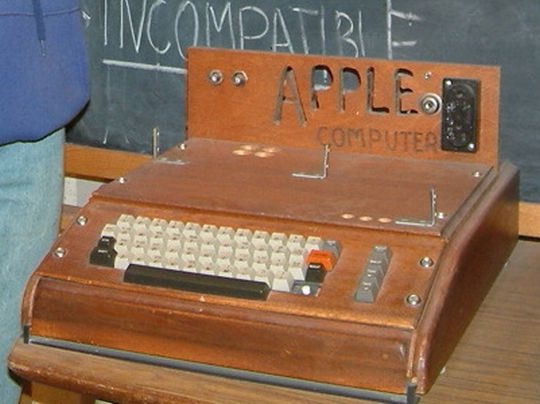
Have you guys wiki the story of first PC from Apple? Oh.. yeah.. the hand-made one.. by Stev and Stev (I think "Stev & Stev sounds better than "Apple", more designer feel.. haha..) Common.. maybe one day some Ontario high student can create a hand made computer or robot or something, right?

May Ontario Gov should consider teaching students how to hand draw diagram.. and.. perhaps we should start writing our programming language in papers! Put all your code on the paper.. just like how we did in exams.. ;-p

Of course.. I was joking..


PS: ops.. dunno why the pic appeared so before.. it's fixed now. ^^

Thursday, January 15, 2009

More about Virtual Machine with Sun VirtualBox


I've been working on a little project on Virtual Machine. And I was trying to setup a network for our networking course, so we can do thing like Beowulf clustering. I used VirtualBox, since it's a cross platform. Because I have tri-boot with Vista/OSX/Fedora. So I can turn on my VM in any system and work on it.

After hours of searching and testing. Finally, I can ssh to and from my VMs and even connected to outside world. Thank you John64 and Vyas(Mohak) testing it for me. There are a lot of things that I'm not quite sure too. But since I've gotta stop playing with my VM and go back to my labs works. I can't spend too much time on it.

Anyway, here is the command to enable port fowarding with the build-in command "VBoxManage". This command allow you control VM configuration and even create a VM with one line command...

= enable Foward ports 2222 to 22 in VirtualBox =
# VBoxManage setextradata vm-F10i686 "VBoxInternal/Devices/pcnet/0/LUN#0/Config/ssh/HostPort" 2222
# VBoxManage setextradata vm-F10i686 "VBoxInternal/Devices/pcnet/0/LUN#0/Config/ssh/GuestPort" 22
# VBoxManage setextradata vm-F10i686 "VBoxInternal/Devices/pcnet/0/LUN#0/Config/ssh/Protocol" TCP

NOte: - vm-F10i686 - is the name in your VirtualBox, not your hostname

= Check configuration with VBoxMange command.
# VBoxManage getextradata vm-F10i686 enumerate

The good thing about using port forwarding is easy. But it has limitation also. Like... if I want to VNC to/from my VM, i'll need to forward another port also. So, instead, my next little project will be working on using DNS server, etc to setup a network (virtual network?) for my VMs. And I'll be using my host (my laptop) as the router, DNS server, etc.

And her are some trick and tips I would like to share with you..
1. If you are setting up same VMs in different machine. You can actually save your image file (.vdi). So you don't have to install again. But it seems a name is writed in the file also. So, I wasn't able to duplicate image file and having two same config VMs running in same host. I may spend sometime to hack about it when I have chance.
2. There is a build-in function called "snapshot" that allow you to capture the system status and recovery it later. But instead, I just copy the image file instead, because it gives me more flexibility when I'm using it in different OS.
3. Install Guest Additions, it's just fun to see a full-screen high resolution Fedora running in your Vista! I was able to have 1440x900 to use my Fedora VM in osx and Fedora host!
4. If you want to have a tri-boot VM with XP, Vista and some Linux. You may want to install XP, Vista and Linux in order. I would suggest to put XP, Vista, Swap as the primary and put all other Linux in your logical drive. Yeah... You can put all different Linux in your vm, Fedora, Ubuntu, FreeBSD... (the list goes on forever)
5. If you have backup, and somehow your vm system is not working. Instead of fixing it, you can just mount the old image file back! It's not a good admin should do, but... if u know the stuffs.. why do it over and over again? ^^

Actually, There are still a lot of things I want to explorer about VM. I could spend a month on it without doing any thing else. But... I'll save this fun later when I'm done the LUX course. Lets put study first. ^^

Nes

Sunday, January 11, 2009

Fedora and my dad..

My dad loves technologies.. but not really brave enough to try new stuffs. I've been asking him to try the Fedora Live CD for months, but he told me there is something wrong to boot. Finally, I got a chance to install F10 for him... hehe..

His desktop is full of virus... no matter his Vista or his XP. You know, once you are using Windows, you don't have to worry about virus, cos you'll get virus for sure, so, why worry? Even if you use it very carefully, you may still need to format and reinstall it after 6 months... well.. in my experience...

Anyway, I setup a Tri-boot for him. He got XP, Linux and Fedora 10 running with a 300Gb big storage for him to spend, since he swap his external 500Gb as the internal now. And I think he kinda like it. I've seen him sometime boot up Fedora and try this and that. Of course, I was a little tricky, I put Fedora if he dosen't press any key at start up, hehe.. so he'll get in Fedora instead of other OS.

And, he always got problem with his video capture card in Vista, cos he couldn't manage to find a driver. Then I found that F10 already support his card. Looks like he's gonna use it more than those Windows....

When my dad really know how to use F10's interface, I think i'll do the same thing to my mum's laptop too. I actually, installed Firefox for her laptop and I think she dosen't even know what's the different tho. If I can manage to find a dictionary with real person speaking... then, she's gonna love it.. ^^

Friday, January 9, 2009

Re-installation for T2107...


On 5th Jan 2009, we all get together and reinstall few different OS in the computers in lab 2107. It was fun and we learned a lot.. here are some photos...


Since I'm so jealous that people can go to FudCon11, I've gotta post more photos here to cover their news, hahaha.. lol

Friday, December 12, 2008

VMzzzz.. F8, F10


Due to Fedora 10 has changed a lot of since Fedora 8, I have had some trouble in praticing my labs. Therefore I install Fedora 8 as a Virtual Machine. And.. install Lightenment as the windows/desktop manager, isnt' cool? It has a Mac feeling, althought vm is quite slow...


Looks like I have had too much fun with my VMs during my final exam lately, hahaha..


Thursday, December 11, 2008

VNC from here to there and than there...


Finally, i did my belated VNC lab. I was planning to use my osx as the vnc client to connect my VNC server in a lab computer, but since I'm lack of skill and time, so i just have to use my Virtual Machine(vm) instead. And I finally, at the end of this lab, I use my Safari browser to connect to the vnc server. And of course, u'll see my lovely desktop again.. ;-p


Question #1: Describe what happenned.
It connect to the host that's running vnc server. But instead of the terminal I'm using, it open up another x window manager.
Question #2: Which window manager is running?
It's using twm.
Question #3: What is the different this time?
It's using another window manager now.
Question #4: What happenned?
The browser trigger the java plugin and started a java based vnc client.
Question #5: When would you find running a veiwer froma web-browser useful?
I would use it some highly secured system when installing software is restricted. Or if I want to vnc my host just for a shrot period, I would use this instead of installing some software into that system.


Monday, December 8, 2008

VM Fedora 10 on Mac.. lovely!


Finally, I got a chance to try Fedora 10, and I tried to use Virtual Box in Mac OSX. It had some problem before, I think VM dosen't have 64bit yet and there was some compatiable problem with sound card in my VM. But lucky, I got my network working. Next step, I'm gonna try making my local driver mountable to F10. I tried with the option "Share Folder" in Virtual Box, but it didn't work. Well.. I'm so happy that I can ssh/sftp from vm to my OSX. I think I need top open a port or virtual port to redirect port 20 from my local host to my VM, but I still dunno how to do it yet. I'm gonna find out....

In this few minutes experience, I found that F10 has improved a lot of graphic interface, althought my vm was kind of slow, but i can see the visual effects has running smoothly.

Anyway, here are some captures. I hope you like my desktop setting. ^^


Thursday, December 4, 2008

LPT730 Assignment 2 - Video Editing and Converting

Here is LPT Assignment 2 for video editing and converting. Since the video were cut well, but the audio were not captured well. I merge stero into mono to provide clearer sound. I used ffmpeg2theora which is fast and provide converting auto to mono and video compression at once. Here is a capture of ffmpeg2theora.

ffpeg2theora funning..


Videos were converted to the following formats:
* OGG Best Quality (native size)
* OGG Broadband Quality (564 Kbps)
* OGG Low Quality (128 Kbps)
* MPEG-4 AVI Medium Quality (564 Kbps)

Location:
//ireland/home/michal/upload

Command Example...

nohup ffmpeg2theora -V 128 -c 1 "Day 1 - 1130 am_Rm. 1014.mov" -o "Day 1 - 1130 am_Rm. 1014-128kb.ogg" &

And some other video tools experience...
I was trying to use Kino add some FX effects and tittle, but it seems Kino crashes a lot. I tried 3 different machine and none of them works, althought I got my video driver installed right. I tried to use VLC which is a famous multi-platform open source video player, and it has a excellent GUI converting function. But it seems the encoding engine didn't work well. The out put of video quality were not as smooth as I expected. I didn't go into other video tools since I spent too much time on this assignment. Dose any one know why I got crashes with Kino?

Converting from VLC

Monday, November 17, 2008

SPR720 Lab - Homebrew python game: GuessGuess(PG)

Love python... cos I don't need to spend too much time on setting variable type so i can have time to really do programing. Compiler is so helpful and style. And the most important thing is, it's cross platform!

So, here is the game I modify from the lab material... make sure you got your parents with me when you're playing it.. hehe.. you'll know...

http://matrix.senecac.on.ca/~tnchan/spr720/

Tuesday, November 11, 2008

Windows Data Migration Tools - Recusive! yahoo!!!

I've been doing my last flag for copy/moving user document function, which is comparing souce and target file and only copy the newer one from souce. It should check all sub-directories also. I was thinking to use os.path.walk, cos when i was talking in irc, someone told me to use it. So i go ahead... and.. here it came the nightmare.

I started coding this ReplaceOld function since 6am this morning.. I couldn't get it done after 4 hours of struggle, cos os.path.walk, dosen't allow me to do what I want. I need to go back to parent directory any time I want and I need the path after the source path. If I keep using this function, I may need to use nested array, which is headache and will use a lot of resources and do a lot of coding too.....

And this morning... finally, i figured out what to do... (on the way to washroom.. lol )...

RECURSIVE FUNCTION!!!

Yes!! so, i dun have to assign a lot of array and just call up the function itself, that's it! As long as my calculate is right, it'd be okay. To me it's just something like an other "for..." loop. And it works!!

But of course, this function is not completed yet. But I'm still so excited! Hope I can finish this function before this week. Then I can move on other functions... ^^

Last night, I started coding from 7pm last night to 7am.. oh yeah.. 12 hours of programing.. hehe... I got 400 lines done so far. And if I'm done with this function, I have 3 totally working functions which included a lot of error flag checking already. And I've got a very smart design of flag sorter/reader function from someone's code on net.

Can't wait to see it? Wait for my WDMT 0.2 release! ^^

Tuesday, October 28, 2008

YOOO!!! HAPPY INDIAN NEW YEAR!!


According to my facebook.. especially from Mohak, i think it's Indian new year... I've got the most handsome Indian student, Mohak, in LUX to say happy new year to you.. ;-p

ops.. i heard there are like 4 new years in India... do i have to post his photo every time?? lol