Lucky that I was playing blogger because my FreeBSD assignment needs to import post from blogger to wordpress. And I did have a backup... that I didn't even remember. Thanks god.. every thing is here.. :-) I still wanna show my blog to my grand children... LOL
Showing posts with label Personal. Show all posts
Showing posts with label Personal. Show all posts
Sunday, April 12, 2009
OH.. My gosh... i almost delete all my post in blogger..
I was managing my label/tag of my post to prepare my project presentation.. i click on the 'delete' below 'apply label', it thought it's delete the label. But no!! it deleted my blog. I actually doubt about it already, but as labeling a blog has an undo function, i thought delete a blog should have an undo, right?
NO!!! IT DOSE NOT!!
Lucky that I was playing blogger because my FreeBSD assignment needs to import post from blogger to wordpress. And I did have a backup... that I didn't even remember. Thanks god.. every thing is here.. :-) I still wanna show my blog to my grand children... LOL
Lucky that I was playing blogger because my FreeBSD assignment needs to import post from blogger to wordpress. And I did have a backup... that I didn't even remember. Thanks god.. every thing is here.. :-) I still wanna show my blog to my grand children... LOL

Thursday, February 19, 2009
CDOT photos - 20090220

Hi, guys.. I've just editing all the photos. and posted it in flicker.com. For some reason, some of the photos in flicker dosen't look so nice. Therefore, I also saved the edited photo in my matrix account. Please see the link below to download. And, yes! facebook.. go tag yourself. ;-)
If you want the original files, please let me know. They are saved in Nikon RAW format (NEF). Make sure you have around 1.5Gb space for them.
LINKS:
flickr
Edited JPEG in zipp format

Monday, February 16, 2009
When i'm waiting for my vm to update..
I'm now waiting for my vm F10 to update... Suddenly wanna blog about a little feeling on learning Linux at Seneca.
Last semester, I was struggling about installing wifi and drivers in my fedora. Learning to use all the tools that I need to replace Windows. This semester, we learning more advanced technology. And I really love stuffs that I'm learning in this semester. Especially networking... we're actually doing a networking with all command service: web, DNS, mail, routing, firewall.
It's been tough weeks in last 2 weeks, I was struggling to setup a VM networking with little knowledge on VM and networking. Well... I did learn networking, but when I have to put every things together, I was confused. But I know it's the learning curve, the turning point. It means I'll be making a bigger step!
Some how I feel a bit relax today. Because I've found that I've learn a lot in last few weeks. Just few months, from knowing almost nothing about Linux to right now, I'm able to start understanding Linux.
Since I'm not working this semester, I've been sitting in front of computer at least 10 hours every day. But I always try to spend one day a week with my parents, take them around in the city or have a cup of coffee. And they love one dollar stores. ;-) That's the only entertainment I have every week... beside watching a movie once a while.
I have to thank Raymond Chan has spend a lot of time on teaching us. He even came in to Seneca on Valentine's day to help us on networking. And it was a Saturday!! And of course, Chris Tyler.
There are still a lot to do, few assignments and mid-term... I know it's gonna be tough, but I'll try my best. If 10 hours is not enough, then I'll spend 15 hours! I just can't give up!!
Oh.. yes.. VM's done upgrading.. time to go back to work.. hope I can go to bed before 3am.. cos I need to wake up at 7...
Last semester, I was struggling about installing wifi and drivers in my fedora. Learning to use all the tools that I need to replace Windows. This semester, we learning more advanced technology. And I really love stuffs that I'm learning in this semester. Especially networking... we're actually doing a networking with all command service: web, DNS, mail, routing, firewall.
It's been tough weeks in last 2 weeks, I was struggling to setup a VM networking with little knowledge on VM and networking. Well... I did learn networking, but when I have to put every things together, I was confused. But I know it's the learning curve, the turning point. It means I'll be making a bigger step!
Some how I feel a bit relax today. Because I've found that I've learn a lot in last few weeks. Just few months, from knowing almost nothing about Linux to right now, I'm able to start understanding Linux.
Since I'm not working this semester, I've been sitting in front of computer at least 10 hours every day. But I always try to spend one day a week with my parents, take them around in the city or have a cup of coffee. And they love one dollar stores. ;-) That's the only entertainment I have every week... beside watching a movie once a while.
I have to thank Raymond Chan has spend a lot of time on teaching us. He even came in to Seneca on Valentine's day to help us on networking. And it was a Saturday!! And of course, Chris Tyler.
There are still a lot to do, few assignments and mid-term... I know it's gonna be tough, but I'll try my best. If 10 hours is not enough, then I'll spend 15 hours! I just can't give up!!
Oh.. yes.. VM's done upgrading.. time to go back to work.. hope I can go to bed before 3am.. cos I need to wake up at 7...
Friday, January 30, 2009
Migrate aNd Manage (mNm) 0.4 Release
In this release, mNm will support space checking with a single command. This will be useful for both command mode and in GUI mode.
And mNm has successfully obtain a space in FedoraHosted. This project's wiki has moved to FedoraHost from zenit's wiki. All the information and source will be found in there. It will be open to public for every one to try out.
Link:
https://fedorahosted.org/mnm/
And mNm has successfully obtain a space in FedoraHosted. This project's wiki has moved to FedoraHost from zenit's wiki. All the information and source will be found in there. It will be open to public for every one to try out.
Link:
https://fedorahosted.org/mnm/
Thursday, January 29, 2009
What? Linux on iPod??!

Yes, that's right.. and they're working on iPhone also.. They have successfully install kernel 2.6 in iPhone..
I was talking with Chinmay Patel about linux and iPod. I told him that he may able to install linux on his new iPod Nano. And he was interested about it. So, I went home and do some searching.. cool. I am so surprised people has successfully installed linux in different type of iPod...
But.. looks like it dosen't support the new fat iPod Nano yet.. well.. u know, it's fun.. but.. how can you type stuffs there???
Download page from iPodLinux.org
More Screen Shots..
LinuxOniPhone Blog
Monday, January 26, 2009
Disable root ssh...
I've been wanted to run my own testing server. Finally, I set it up today. Sign up an account in DynDNS.com. Set up some setting in my wifi router so it can update my dynamic IP regular. After some configuration, that's it! It was like 10mins work. ssh works, tunneling works, sftp works.. nice!
But of course, having a server that would let people connect to it is quite dangerous. Especially, it's my home network. I was lucky enough to see Professor Raymond Chan online.. oh.. i'm not gonna miss the chance, right? SO, I asked him the best way to setup the iptables. So, I drop all incoming, except ssh port. I'm gonna open port 80 so I can play apache server a bit. ^^ And on my router side, I set more security options in my router. I may setup a VPN or something, just incase if someone hack into my server. They can't access some of my Windows machine.
Then, did some testing from different network... from cdot machines, from my iPhone.. cool.. it worked! But connecting from iPhone needs some trick. The trick is have to make sure the iPhone has an IP first. It's kinda weired...
When I was testing the login, I almost forgot to test if I could ssh with root.. oh.. yeah.. gotta disable it. 30second search on net, found the disable root login. I would love to share with any one...
= First, make sure u have root privilege, u can either use "sudo" or "su -".. then...
vi /etc/ssh/sshd_config
= find the following line.. remove "#" and change "yes" to "no"
PermitRootLogin no
= save and test!!
That's it!
At this point, I'm not sure what I'll be testing on it.. Apache, of course.. I may set up a small Beowulf cluster if it's possible. I hope I'll able to run VM in this machine.. but this machine is only like 700mhz AMD CPU with 512 ram.. it'd be really slow to run VM.
Ideally, I should put this server in front of my home network. Set it as a router with strong firewall protection, put my home network be hide it. I don't have a real plan for this yet... Lets see if I have time for it... ^^
But of course, having a server that would let people connect to it is quite dangerous. Especially, it's my home network. I was lucky enough to see Professor Raymond Chan online.. oh.. i'm not gonna miss the chance, right? SO, I asked him the best way to setup the iptables. So, I drop all incoming, except ssh port. I'm gonna open port 80 so I can play apache server a bit. ^^ And on my router side, I set more security options in my router. I may setup a VPN or something, just incase if someone hack into my server. They can't access some of my Windows machine.
Then, did some testing from different network... from cdot machines, from my iPhone.. cool.. it worked! But connecting from iPhone needs some trick. The trick is have to make sure the iPhone has an IP first. It's kinda weired...
When I was testing the login, I almost forgot to test if I could ssh with root.. oh.. yeah.. gotta disable it. 30second search on net, found the disable root login. I would love to share with any one...
= First, make sure u have root privilege, u can either use "sudo" or "su -".. then...
vi /etc/ssh/sshd_config
= find the following line.. remove "#" and change "yes" to "no"
PermitRootLogin no
= save and test!!
That's it!
At this point, I'm not sure what I'll be testing on it.. Apache, of course.. I may set up a small Beowulf cluster if it's possible. I hope I'll able to run VM in this machine.. but this machine is only like 700mhz AMD CPU with 512 ram.. it'd be really slow to run VM.
Ideally, I should put this server in front of my home network. Set it as a router with strong firewall protection, put my home network be hide it. I don't have a real plan for this yet... Lets see if I have time for it... ^^
Sunday, January 25, 2009
youtube and my mum.. and.. woodmaking...
I've been doing the lab.. feeling like to relax a bit.. so, let me blog something interesting here...
Recently, my mum just got a new computer, so she can use dictionary with a computer and I can have one more new toy too. ^^ NICE!!
After days of installing and reinstalling... I manage to install Fedora 10.. oh yeah.. but..too bad that the sound card driver dosen't wrok so well.. StarDict dosen't produce some good sound. And Adobe flash dosen't work too.. well.. all expected... SO I just have to let her use XP.. too bad..
Then I showed her youtube.. she loves it. Now, she can watch her favourite show online...looks like.. My dad and I have to eat instance noodle for weeks.. hahaaha..

I read about Comp Study in high school by Chris Tyler few days ago. I woke up in the morning.. day dreaming.. then I thought.. wait.. woodmaking dose related to programing!! hahaha..
Have you guys wiki the story of first PC from Apple? Oh.. yeah.. the hand-made one.. by Stev and Stev (I think "Stev & Stev sounds better than "Apple", more designer feel.. haha..) Common.. maybe one day some Ontario high student can create a hand made computer or robot or something, right?
May Ontario Gov should consider teaching students how to hand draw diagram.. and.. perhaps we should start writing our programming language in papers! Put all your code on the paper.. just like how we did in exams.. ;-p
Of course.. I was joking..

PS: ops.. dunno why the pic appeared so before.. it's fixed now. ^^
Recently, my mum just got a new computer, so she can use dictionary with a computer and I can have one more new toy too. ^^ NICE!!
After days of installing and reinstalling... I manage to install Fedora 10.. oh yeah.. but..too bad that the sound card driver dosen't wrok so well.. StarDict dosen't produce some good sound. And Adobe flash dosen't work too.. well.. all expected... SO I just have to let her use XP.. too bad..
Then I showed her youtube.. she loves it. Now, she can watch her favourite show online...looks like.. My dad and I have to eat instance noodle for weeks.. hahaaha..
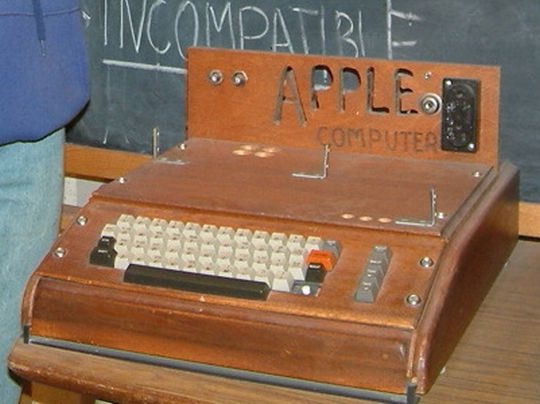
I read about Comp Study in high school by Chris Tyler few days ago. I woke up in the morning.. day dreaming.. then I thought.. wait.. woodmaking dose related to programing!! hahaha..
Have you guys wiki the story of first PC from Apple? Oh.. yeah.. the hand-made one.. by Stev and Stev (I think "Stev & Stev sounds better than "Apple", more designer feel.. haha..) Common.. maybe one day some Ontario high student can create a hand made computer or robot or something, right?
May Ontario Gov should consider teaching students how to hand draw diagram.. and.. perhaps we should start writing our programming language in papers! Put all your code on the paper.. just like how we did in exams.. ;-p
Of course.. I was joking..

PS: ops.. dunno why the pic appeared so before.. it's fixed now. ^^
Thursday, January 15, 2009
More about Virtual Machine with Sun VirtualBox

I've been working on a little project on Virtual Machine. And I was trying to setup a network for our networking course, so we can do thing like Beowulf clustering. I used VirtualBox, since it's a cross platform. Because I have tri-boot with Vista/OSX/Fedora. So I can turn on my VM in any system and work on it.
After hours of searching and testing. Finally, I can ssh to and from my VMs and even connected to outside world. Thank you John64 and Vyas(Mohak) testing it for me. There are a lot of things that I'm not quite sure too. But since I've gotta stop playing with my VM and go back to my labs works. I can't spend too much time on it.
Anyway, here is the command to enable port fowarding with the build-in command "VBoxManage". This command allow you control VM configuration and even create a VM with one line command...
= enable Foward ports 2222 to 22 in VirtualBox =
# VBoxManage setextradata vm-F10i686 "VBoxInternal/Devices/pcnet/0/LUN#0/Config/ssh/HostPort" 2222
# VBoxManage setextradata vm-F10i686 "VBoxInternal/Devices/pcnet/0/LUN#0/Config/ssh/GuestPort" 22
# VBoxManage setextradata vm-F10i686 "VBoxInternal/Devices/pcnet/0/LUN#0/Config/ssh/Protocol" TCP
NOte: - vm-F10i686 - is the name in your VirtualBox, not your hostname
= Check configuration with VBoxMange command.
# VBoxManage getextradata vm-F10i686 enumerate
The good thing about using port forwarding is easy. But it has limitation also. Like... if I want to VNC to/from my VM, i'll need to forward another port also. So, instead, my next little project will be working on using DNS server, etc to setup a network (virtual network?) for my VMs. And I'll be using my host (my laptop) as the router, DNS server, etc.
And her are some trick and tips I would like to share with you..
1. If you are setting up same VMs in different machine. You can actually save your image file (.vdi). So you don't have to install again. But it seems a name is writed in the file also. So, I wasn't able to duplicate image file and having two same config VMs running in same host. I may spend sometime to hack about it when I have chance.
2. There is a build-in function called "snapshot" that allow you to capture the system status and recovery it later. But instead, I just copy the image file instead, because it gives me more flexibility when I'm using it in different OS.
3. Install Guest Additions, it's just fun to see a full-screen high resolution Fedora running in your Vista! I was able to have 1440x900 to use my Fedora VM in osx and Fedora host!
4. If you want to have a tri-boot VM with XP, Vista and some Linux. You may want to install XP, Vista and Linux in order. I would suggest to put XP, Vista, Swap as the primary and put all other Linux in your logical drive. Yeah... You can put all different Linux in your vm, Fedora, Ubuntu, FreeBSD... (the list goes on forever)
5. If you have backup, and somehow your vm system is not working. Instead of fixing it, you can just mount the old image file back! It's not a good admin should do, but... if u know the stuffs.. why do it over and over again? ^^
Actually, There are still a lot of things I want to explorer about VM. I could spend a month on it without doing any thing else. But... I'll save this fun later when I'm done the LUX course. Lets put study first. ^^
Nes
Sunday, January 11, 2009
Fedora and my dad..
My dad loves technologies.. but not really brave enough to try new stuffs. I've been asking him to try the Fedora Live CD for months, but he told me there is something wrong to boot. Finally, I got a chance to install F10 for him... hehe..
His desktop is full of virus... no matter his Vista or his XP. You know, once you are using Windows, you don't have to worry about virus, cos you'll get virus for sure, so, why worry? Even if you use it very carefully, you may still need to format and reinstall it after 6 months... well.. in my experience...
Anyway, I setup a Tri-boot for him. He got XP, Linux and Fedora 10 running with a 300Gb big storage for him to spend, since he swap his external 500Gb as the internal now. And I think he kinda like it. I've seen him sometime boot up Fedora and try this and that. Of course, I was a little tricky, I put Fedora if he dosen't press any key at start up, hehe.. so he'll get in Fedora instead of other OS.
And, he always got problem with his video capture card in Vista, cos he couldn't manage to find a driver. Then I found that F10 already support his card. Looks like he's gonna use it more than those Windows....
When my dad really know how to use F10's interface, I think i'll do the same thing to my mum's laptop too. I actually, installed Firefox for her laptop and I think she dosen't even know what's the different tho. If I can manage to find a dictionary with real person speaking... then, she's gonna love it.. ^^
His desktop is full of virus... no matter his Vista or his XP. You know, once you are using Windows, you don't have to worry about virus, cos you'll get virus for sure, so, why worry? Even if you use it very carefully, you may still need to format and reinstall it after 6 months... well.. in my experience...
Anyway, I setup a Tri-boot for him. He got XP, Linux and Fedora 10 running with a 300Gb big storage for him to spend, since he swap his external 500Gb as the internal now. And I think he kinda like it. I've seen him sometime boot up Fedora and try this and that. Of course, I was a little tricky, I put Fedora if he dosen't press any key at start up, hehe.. so he'll get in Fedora instead of other OS.
And, he always got problem with his video capture card in Vista, cos he couldn't manage to find a driver. Then I found that F10 already support his card. Looks like he's gonna use it more than those Windows....
When my dad really know how to use F10's interface, I think i'll do the same thing to my mum's laptop too. I actually, installed Firefox for her laptop and I think she dosen't even know what's the different tho. If I can manage to find a dictionary with real person speaking... then, she's gonna love it.. ^^
Thursday, December 11, 2008
VNC from here to there and than there...

Finally, i did my belated VNC lab. I was planning to use my osx as the vnc client to connect my VNC server in a lab computer, but since I'm lack of skill and time, so i just have to use my Virtual Machine(vm) instead. And I finally, at the end of this lab, I use my Safari browser to connect to the vnc server. And of course, u'll see my lovely desktop again.. ;-p

Question #1: Describe what happenned.
It connect to the host that's running vnc server. But instead of the terminal I'm using, it open up another x window manager.
Question #2: Which window manager is running?
It's using twm.
Question #3: What is the different this time?
It's using another window manager now.
Question #4: What happenned?
The browser trigger the java plugin and started a java based vnc client.
Question #5: When would you find running a veiwer froma web-browser useful?
I would use it some highly secured system when installing software is restricted. Or if I want to vnc my host just for a shrot period, I would use this instead of installing some software into that system.

Monday, November 17, 2008
0.2 Relase Contributions - De-Luxer Community
It's almost the end of semester. I'm so glad that I'm doing LUX in Seneca@york. All my classmates are friendly and nice. We're like a small group of community, we help each other to learn and acheive our goals.
I'm so glad to meet Milton and Mohak. They helped me a lot on my LUX Project and the arcade project. Of course, I gave them some help too. Beside them, I also helped Steven Liang a little bit on his project. Since we don't speak perfect English, we try to help each other to understand what we miss in class and things for our projects.
I heard that next sem is gonna be tough on project. I've gotta finish my functions this month, so I can work on the GUI next sem.. ^^
And good luck on your project guys...
I'm so glad to meet Milton and Mohak. They helped me a lot on my LUX Project and the arcade project. Of course, I gave them some help too. Beside them, I also helped Steven Liang a little bit on his project. Since we don't speak perfect English, we try to help each other to understand what we miss in class and things for our projects.
I heard that next sem is gonna be tough on project. I've gotta finish my functions this month, so I can work on the GUI next sem.. ^^
And good luck on your project guys...
SPR720 Lab - Homebrew python game: GuessGuess(PG)
Love python... cos I don't need to spend too much time on setting variable type so i can have time to really do programing. Compiler is so helpful and style. And the most important thing is, it's cross platform!
So, here is the game I modify from the lab material... make sure you got your parents with me when you're playing it.. hehe.. you'll know...
http://matrix.senecac.on.ca/~tnchan/spr720/
So, here is the game I modify from the lab material... make sure you got your parents with me when you're playing it.. hehe.. you'll know...
http://matrix.senecac.on.ca/~tnchan/spr720/
Tuesday, November 11, 2008
Windows Data Migration Tools - Recusive! yahoo!!!
I've been doing my last flag for copy/moving user document function, which is comparing souce and target file and only copy the newer one from souce. It should check all sub-directories also. I was thinking to use os.path.walk, cos when i was talking in irc, someone told me to use it. So i go ahead... and.. here it came the nightmare.
I started coding this ReplaceOld function since 6am this morning.. I couldn't get it done after 4 hours of struggle, cos os.path.walk, dosen't allow me to do what I want. I need to go back to parent directory any time I want and I need the path after the source path. If I keep using this function, I may need to use nested array, which is headache and will use a lot of resources and do a lot of coding too.....
And this morning... finally, i figured out what to do... (on the way to washroom.. lol )...
RECURSIVE FUNCTION!!!
Yes!! so, i dun have to assign a lot of array and just call up the function itself, that's it! As long as my calculate is right, it'd be okay. To me it's just something like an other "for..." loop. And it works!!
But of course, this function is not completed yet. But I'm still so excited! Hope I can finish this function before this week. Then I can move on other functions... ^^
Last night, I started coding from 7pm last night to 7am.. oh yeah.. 12 hours of programing.. hehe... I got 400 lines done so far. And if I'm done with this function, I have 3 totally working functions which included a lot of error flag checking already. And I've got a very smart design of flag sorter/reader function from someone's code on net.
Can't wait to see it? Wait for my WDMT 0.2 release! ^^
I started coding this ReplaceOld function since 6am this morning.. I couldn't get it done after 4 hours of struggle, cos os.path.walk, dosen't allow me to do what I want. I need to go back to parent directory any time I want and I need the path after the source path. If I keep using this function, I may need to use nested array, which is headache and will use a lot of resources and do a lot of coding too.....
And this morning... finally, i figured out what to do... (on the way to washroom.. lol )...
RECURSIVE FUNCTION!!!
Yes!! so, i dun have to assign a lot of array and just call up the function itself, that's it! As long as my calculate is right, it'd be okay. To me it's just something like an other "for..." loop. And it works!!
But of course, this function is not completed yet. But I'm still so excited! Hope I can finish this function before this week. Then I can move on other functions... ^^
Last night, I started coding from 7pm last night to 7am.. oh yeah.. 12 hours of programing.. hehe... I got 400 lines done so far. And if I'm done with this function, I have 3 totally working functions which included a lot of error flag checking already. And I've got a very smart design of flag sorter/reader function from someone's code on net.
Can't wait to see it? Wait for my WDMT 0.2 release! ^^
Tuesday, November 4, 2008
Kick Start - Creating User in Automatic Installation
In the lecture, Prof. John Selmy suggested me to have a look of kick start configuration options, I may able to use one or two function from kickstart. So I did.. and yeah.. it dose support user creation!
It seems useful. When I was thinking how to use it, I had a second thought. Because if I use kickstart to do user migration, then, the adminstrator can not use the Windows Data Migration Tools (WDMT) after installation. Then it is not the concept of WDMT, cos we want WDMT to support post-installation migration.
But i found some other usefull options. First one is cmdline, it support some non-interactive command to run during installation. It's cool. Because you can run your own bash, python script to do something that the installation dose not support. Second one is firstboot, it will allow system to enable or disable firstboot to run after the system is installed. I would properly disable it if I am using kick start to install a lot of machines. Because I prefer to do those first boot functions our self. ^^
Anyway, I was of surprised how many options kickstart support.. There must be like 100 options. It's a really good administrators tool. ^^
============================
user (optional)
Creates a new user on the system.
user --name= [--groups=
It seems useful. When I was thinking how to use it, I had a second thought. Because if I use kickstart to do user migration, then, the adminstrator can not use the Windows Data Migration Tools (WDMT) after installation. Then it is not the concept of WDMT, cos we want WDMT to support post-installation migration.
But i found some other usefull options. First one is cmdline, it support some non-interactive command to run during installation. It's cool. Because you can run your own bash, python script to do something that the installation dose not support. Second one is firstboot, it will allow system to enable or disable firstboot to run after the system is installed. I would properly disable it if I am using kick start to install a lot of machines. Because I prefer to do those first boot functions our self. ^^
Anyway, I was of surprised how many options kickstart support.. There must be like 100 options. It's a really good administrators tool. ^^
============================
user (optional)
Creates a new user on the system.
user --name=
- ] [--homedir=
--name=
Provides the name of the user. This option is required.
--groups=
In addition to the default group, a comma separated list of group names the user should belong to.
--homedir=
The home directory for the user. If not provided, this defaults to /home/
--password=
The new user's password. If not provided, the account will be locked by default.
--iscrypted
Is the password provided by --password already encrypted or not?
--shell=
The user's login shell. If not provided, this defaults to the system default.
--uid=
The user's UID. If not provided, this defaults to the next available non-system UID.
cmdline (optional)
Perform the installation in a completely non-interactive command line mode. Any prompts for interaction will halt the install. This mode is useful on S/390 systems with the x3270 console.
firstboot (optional)
Determine whether the Setup Agent starts the first time the system is booted. If enabled, the firstboot package must be installed. If not specified, this option is disabled by default.
--enable or --enabled
The Setup Agent is started the first time the system boots.
--disable or --disabled
The Setup Agent is not started the first time the system boots.
--reconfig
Enable the Setup Agent to start at boot time in reconfiguration mode. This mode enables the language, mouse, keyboard, root password, security level, time zone, and networking configuration options in addition to the default ones.
Monday, November 3, 2008
Windows Data Migration Tool - Plan for 0.2 Rlease
After researching on Windows XP, Vista system, I think it's time to do some actual coding.
I'm planning to write all the codes for user and directory handling. Which included user search and create, directory search and create. The functions sounds complicated but the concept is easy. All it will do is list vista/xp home directory and generate a list, administrators files will be moved to root in linux.
The program will be writen in multiple function format, in one big python code files. User will be able to run the program with running "wdmt" with flags. It may not have full support in 0.2 release, but may able to handle basic user search and folders functions.
Please refer to my wiki for detail informations...
Windows Data Migration Tool in Fedora Project
Windows Data Migration Tool in Seneca Open Source Wiki
I'm planning to write all the codes for user and directory handling. Which included user search and create, directory search and create. The functions sounds complicated but the concept is easy. All it will do is list vista/xp home directory and generate a list, administrators files will be moved to root in linux.
The program will be writen in multiple function format, in one big python code files. User will be able to run the program with running "wdmt" with flags. It may not have full support in 0.2 release, but may able to handle basic user search and folders functions.
Please refer to my wiki for detail informations...
Windows Data Migration Tool in Fedora Project
Windows Data Migration Tool in Seneca Open Source Wiki
Wednesday, October 29, 2008
Windows Data Migration Tool - User Migration Functions Plan
Saturday, October 25, 2008
FSOSS Photos...


Thank you for supporting FSOSS...
for all FSOSS photos in flickr...
http://flickr.com/photos/tags/fsoss2008/
If you're uploading some photos of FSOSS, please tag your photos as "fsoss2008", Thank you and enjoy..
BTW, here is my own FSOSS selection...
http://www.flickr.com/photos/bossa_nesta/sets/72157608348787296/show/with/2971273642/
Tuesday, October 7, 2008
MUM!!! I'm on TV!!! (Live)


Hey, mum!! I'm on tv!! well.. maybe youtube. So, at this moment, rpm speech is going in the class. ^^ BRB for more update
Tuesday, September 30, 2008
SPR720 my madwifi driver..
I've been trying to install my Athero 5700 wifi driver in my fedora, but it always fails. Since I had a experience of successful installing HP laptop wifi driver in Ubuntu, so I install Ubuntu today.
I spend less than 1 hours to install ubuntu. Then i tried to install my driver in my fedora mount under ubuntu, but maybe there is soem permission problem, it didn't install. So, I copy the tar file to my root directory and install it there. It works like a charm. I don't even need to modify the kernel path or any thing.
Well... it was too soon to be happy. 'cos somehow the wifi still dosent' work. I upgrade Ubuntu to the most update version already. But NetworkManager still dosen't recongnize it. Why?? but why??? I'm start feeling so frustrated about Linux... But.. of course I won't give up. I've gotta learn, since I'm takign this course now...
I spend less than 1 hours to install ubuntu. Then i tried to install my driver in my fedora mount under ubuntu, but maybe there is soem permission problem, it didn't install. So, I copy the tar file to my root directory and install it there. It works like a charm. I don't even need to modify the kernel path or any thing.
Well... it was too soon to be happy. 'cos somehow the wifi still dosent' work. I upgrade Ubuntu to the most update version already. But NetworkManager still dosen't recongnize it. Why?? but why??? I'm start feeling so frustrated about Linux... But.. of course I won't give up. I've gotta learn, since I'm takign this course now...
Tuesday, September 23, 2008
Subscribe to:
Posts (Atom)
