Friday, February 13, 2009

Migrate aNd Manage (mNm) 0.5 Release


This is the GUI release of Migrate aNd Manage. This GUI verion only support single folder migrations. Again, the source can be found in FedorHosted.org

GUI feature:
= Auto typing
= Call up mNm single user migration function

Wednesday, February 11, 2009

The VM CLone War...


= The VM Clone War =
Lately, the LUX team has been using VM a lot. And I think half of us are using Virtual Box. And we have to setup a network with VMs. Instead of installing your system one by one, you can actually clone you hard disk and add another vm. On my beloved LUX-ers requested, here is how your clone your vm HD.


=======================================================================
1. First, clone your hard disk with VBoxManage command
VBoxManage clonehd /media/NesEeeStorage/VMs/vm-Fedora10c.vdi /media/NesEeeStorage/VMs/vm-Fedora10a.vdi

2. Add your new vm with a different name.
=======================================================================
Here is the capture....
=======================================================================
[bossanesta@NesEeeF10 VMs]$ VBoxManage clonehd /media/NesEeeStorage/VMs/vm-Fedora10c.vdi /media/NesEeeStorage/VMs/vm-Fedora10a.vdi
VirtualBox Command Line Management Interface Version 2.1.2
(C) 2005-2009 Sun Microsystems, Inc.
All rights reserved.

0%...10%...20%...30%...40%...
=======================================================================


=== NOTES ===

= if your VM's HDs are in different path =
The VBoxManage is kinda weired. When you run it, it will only search vm's harddisks in default path. So, if you changed your vm location like I do. Use full path just like me.

= creating VM with command
You can do it in GUI mode or.. if you wanna be a VBox-Guru, try "VBoxManage create". "man VBoxManage" is your friend.

= about VM networking
I've been trying to create a VM network. well.. got a lot of trouble.. @@ but i found there is a typo in VBox's office tutorial . It drove me crazy, cos I didn't expect a simple mistake from an official site while a lot of people I know got help from that page. So, I was trying to yum install this and yum install that.. My ubuntu's vbox is not working now, cos somehow I got a wrong version of vbox. Anyway, here is the typo....

PATH=/sbin:/usr/bin:/bin:/usr/bin <== the last one should be "/usr/sbin".

= It's cross platform!
Do not forget that VBox is cross platform! It means, If you have a dual or tri or quad boot like me, you can run your VM in Linux, Windows, Solaris, OSX!! That's the reason why I'm using it instead of KVM althought KVM provide a better control.

= Cloning is good news for lazy sys admin
It's always good to keep a copy of your VM. Because if you don't have enough time to trouble shot your VM and things happened. You can always go back to the one your clone before. I have been using VM for 1 months, created over 10 VMs so far in 3 tri-boot laptops. And I found that sometime the VM's hd got problem if you restart a lot. And I always just use another one, cos it's faster than scanning the HD.

= DO NOT UPGRADE!!! =
I not a big fans of auto update. First newer dosen't mean better, second, you may have a big chance that things are not working. That including linux kernel and vbox. When I was trying to install VBoxManage, I downloaded the package from repo.. and.. my vbox dosen't work any more. I guess it happened to Mohak(vyas) also. And he used the windows way to fix this linux problem --> uninstall and install. And it worked... @@ Looks like I'll do the same thing... I'm putting this in the last point, cos I dun want ppl know that I'm using the "windows way" to trouble shot.. and u know.. ususally people dun even bother read the whole blog. ;-p

Wednesday, February 4, 2009

A Emtional FreeBSD in VM, with bad temper...


I've been trying to install FreeBSD in Virtual Machine since week 1. The first few times, I was stuck in how to install it. Yeah.. i guess I get to used to "next-and-next" installations. The concept in FreeBSD is totally different.

Some how I managed to find a simple installation guide for FreeBSD. Obviously the official guide didn't help me. So, I managed to install in a Toshiba Laptop which runs a Intel Celeron M CPU.

And a hardworking student like me, of course, won't be proud of using a step by step installation. So, I tried to install in another Compaq laptop which has an Intel Dual Core CPU. And I even learned more the installation procedure. In BSD, every thing is manual. If you miss a step, you may end up installing nothing but with an error in your boot loader. And somehow the standard FreeBSD bootloader never work for me. I had to use MBR instead. Of course, I've got no clue why...

Interestingly, FreeBSD crashes all the time in my VM. Even I tried to install few times, because I thought I did something wrong during installations. Anyway, re-installing didn't work. It just shutdown itself during boot. But I could to safe mode.

Then I talked with my classmates, Milton. Miltan said he had simular problem, but it worked after he restarted. Well.. not in my case, I tried restart few times, went to safe mode and restart.. no.. didn't work.

Right now, when I'm just about to turn it on and tried to capture a screen shot of its dead-look and also check the logs. It works!!! @@ tried init 6, restart... still works...

I've got no clue at all. I guess maybe it's because of I changed the NIC and I had to install the driver. I'll try to change the NIC again and see what will happens.

I tried it on Friday for the whole day, 7 hours!!! not mentioning other time I put in. What have I done to deserve this? ;-p

Friday, January 30, 2009

Migrate aNd Manage (mNm) 0.4 Release

In this release, mNm will support space checking with a single command. This will be useful for both command mode and in GUI mode.

And mNm has successfully obtain a space in FedoraHosted. This project's wiki has moved to FedoraHost from zenit's wiki. All the information and source will be found in there. It will be open to public for every one to try out.

Link:
https://fedorahosted.org/mnm/

Thursday, January 29, 2009

What? Linux on iPod??!


Yes, that's right.. and they're working on iPhone also.. They have successfully install kernel 2.6 in iPhone..

I was talking with Chinmay Patel about linux and iPod. I told him that he may able to install linux on his new iPod Nano. And he was interested about it. So, I went home and do some searching.. cool. I am so surprised people has successfully installed linux in different type of iPod...

But.. looks like it dosen't support the new fat iPod Nano yet.. well.. u know, it's fun.. but.. how can you type stuffs there???


Download page from iPodLinux.org

More Screen Shots..

LinuxOniPhone Blog

Monday, January 26, 2009

Disable root ssh...

I've been wanted to run my own testing server. Finally, I set it up today. Sign up an account in DynDNS.com. Set up some setting in my wifi router so it can update my dynamic IP regular. After some configuration, that's it! It was like 10mins work. ssh works, tunneling works, sftp works.. nice!

But of course, having a server that would let people connect to it is quite dangerous. Especially, it's my home network. I was lucky enough to see Professor Raymond Chan online.. oh.. i'm not gonna miss the chance, right? SO, I asked him the best way to setup the iptables. So, I drop all incoming, except ssh port. I'm gonna open port 80 so I can play apache server a bit. ^^ And on my router side, I set more security options in my router. I may setup a VPN or something, just incase if someone hack into my server. They can't access some of my Windows machine.

Then, did some testing from different network... from cdot machines, from my iPhone.. cool.. it worked! But connecting from iPhone needs some trick. The trick is have to make sure the iPhone has an IP first. It's kinda weired...

When I was testing the login, I almost forgot to test if I could ssh with root.. oh.. yeah.. gotta disable it. 30second search on net, found the disable root login. I would love to share with any one...

= First, make sure u have root privilege, u can either use "sudo" or "su -".. then...
vi /etc/ssh/sshd_config
= find the following line.. remove "#" and change "yes" to "no"
PermitRootLogin no
= save and test!!

That's it!

At this point, I'm not sure what I'll be testing on it.. Apache, of course.. I may set up a small Beowulf cluster if it's possible. I hope I'll able to run VM in this machine.. but this machine is only like 700mhz AMD CPU with 512 ram.. it'd be really slow to run VM.

Ideally, I should put this server in front of my home network. Set it as a router with strong firewall protection, put my home network be hide it. I don't have a real plan for this yet... Lets see if I have time for it... ^^

Sunday, January 25, 2009

youtube and my mum.. and.. woodmaking...

I've been doing the lab.. feeling like to relax a bit.. so, let me blog something interesting here...

Recently, my mum just got a new computer, so she can use dictionary with a computer and I can have one more new toy too. ^^ NICE!!

After days of installing and reinstalling... I manage to install Fedora 10.. oh yeah.. but..too bad that the sound card driver dosen't wrok so well.. StarDict dosen't produce some good sound. And Adobe flash dosen't work too.. well.. all expected... SO I just have to let her use XP.. too bad..

Then I showed her youtube.. she loves it. Now, she can watch her favourite show online...looks like.. My dad and I have to eat instance noodle for weeks.. hahaaha..


I read about Comp Study in high school by Chris Tyler few days ago. I woke up in the morning.. day dreaming.. then I thought.. wait.. woodmaking dose related to programing!! hahaha..

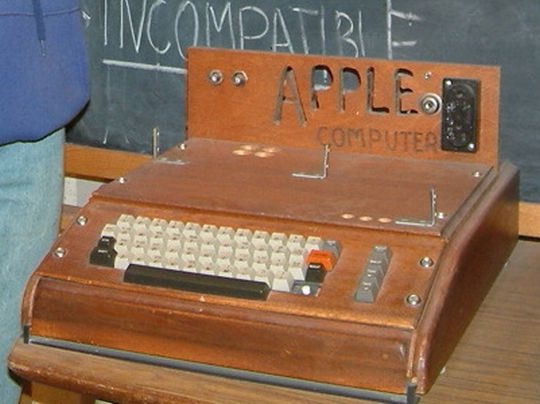
Have you guys wiki the story of first PC from Apple? Oh.. yeah.. the hand-made one.. by Stev and Stev (I think "Stev & Stev sounds better than "Apple", more designer feel.. haha..) Common.. maybe one day some Ontario high student can create a hand made computer or robot or something, right?

May Ontario Gov should consider teaching students how to hand draw diagram.. and.. perhaps we should start writing our programming language in papers! Put all your code on the paper.. just like how we did in exams.. ;-p

Of course.. I was joking..


PS: ops.. dunno why the pic appeared so before.. it's fixed now. ^^